Hockinson School District will be updating some of our educational technology platforms for students and parents. We want to share what you can expect and where to find information beginning in the 2026-27 school year. Read more here.
Why This Matters
We understand that technology changes can sometimes feel overwhelming for families. However, these updates allow the Hockinson School District to transition to platforms that are considerably less expensive. By reducing these platform costs, HSD is able to eliminate Chromebook Assurance—keeping our Chromebook repair program completely free for all families! If a student's Chromebook breaks accidentally or experiences a defect, our tech team will repair and return it at no cost. (Note: Damage determined to be intentional or due to severe negligence may still incur a fine).
What’s Changing?
Some of our familiar platforms are changing to streamlined, cost-effective alternatives while retaining full functionality:
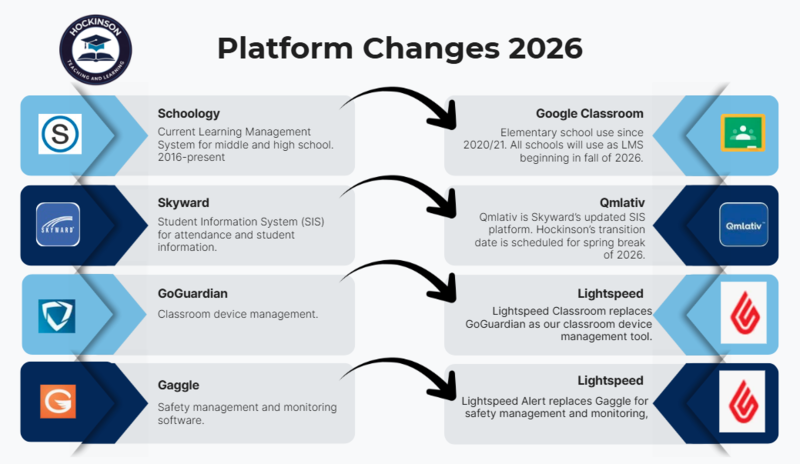
Schoology → Google Classroom: All schools will use Google Classroom as the primary Learning Management System beginning in fall 2026. This is where students will find assignments and class information.
Skyward → Qmlativ: Qmlativ is Skyward’s updated Student Information System (SIS) platform for grades, attendance, and student information. This is where parents can check on student grades & attendance and update student & family information.
GoGuardian → Lightspeed Classroom: Lightspeed Classroom replaces GoGuardian for classroom device management, helping to ensure students are on task and accessing appropriate digital resources during class.
Gaggle → Lightspeed Alert: Lightspeed Alert replaces Gaggle for safety management and monitoring software, ensuring that students are safe and accessing appropriate content outside of school.
Important Tech Guidelines for Students
To ensure a safe, distraction-free, and academically focused learning environment, we are streamlining the digital tools available to students during the school day. YouTube access will be restricted unless directly assigned by a teacher through Google Classroom. Additionally, to protect student safety and privacy, public AI chatbots such as ChatGPT and Claude will not be accessible on student accounts. The only AI tool permitted is Google Gemini, which is strictly regulated and monitored through our Google for Education account and Lightspeed firewall.
Support and Resources
As you're starting your year, you may want to access Qmlativ to update your student’s information, add money to their lunch account, or view their schedule (once available). Instructions on how to access Qmlativ are in the navigating Qmlativ guide linked below.
Getting Started with Qmlativ Qmlativ will serve as the primary hub for parent resources, grades, attendance, and assignment updates. Access your account here: Qmlativ Parent Portal. Need help navigating the new system? Check out our comprehensive parent guide containing step-by-step tutorials and a short walkthrough video: |